


Multi-threaded. Private. Native.
120 AI Chat aims to deliver a smooth, high-performance native experience for AI-powered conversations.
- 15 AI providers
- Cloud and local models
- Compare up to three responses
- Bring your own API keys
- Chat history stored locally
- Native on macOS and Windows


Features
Every model, side by side
Run several models at once and keep each thread's own settings.
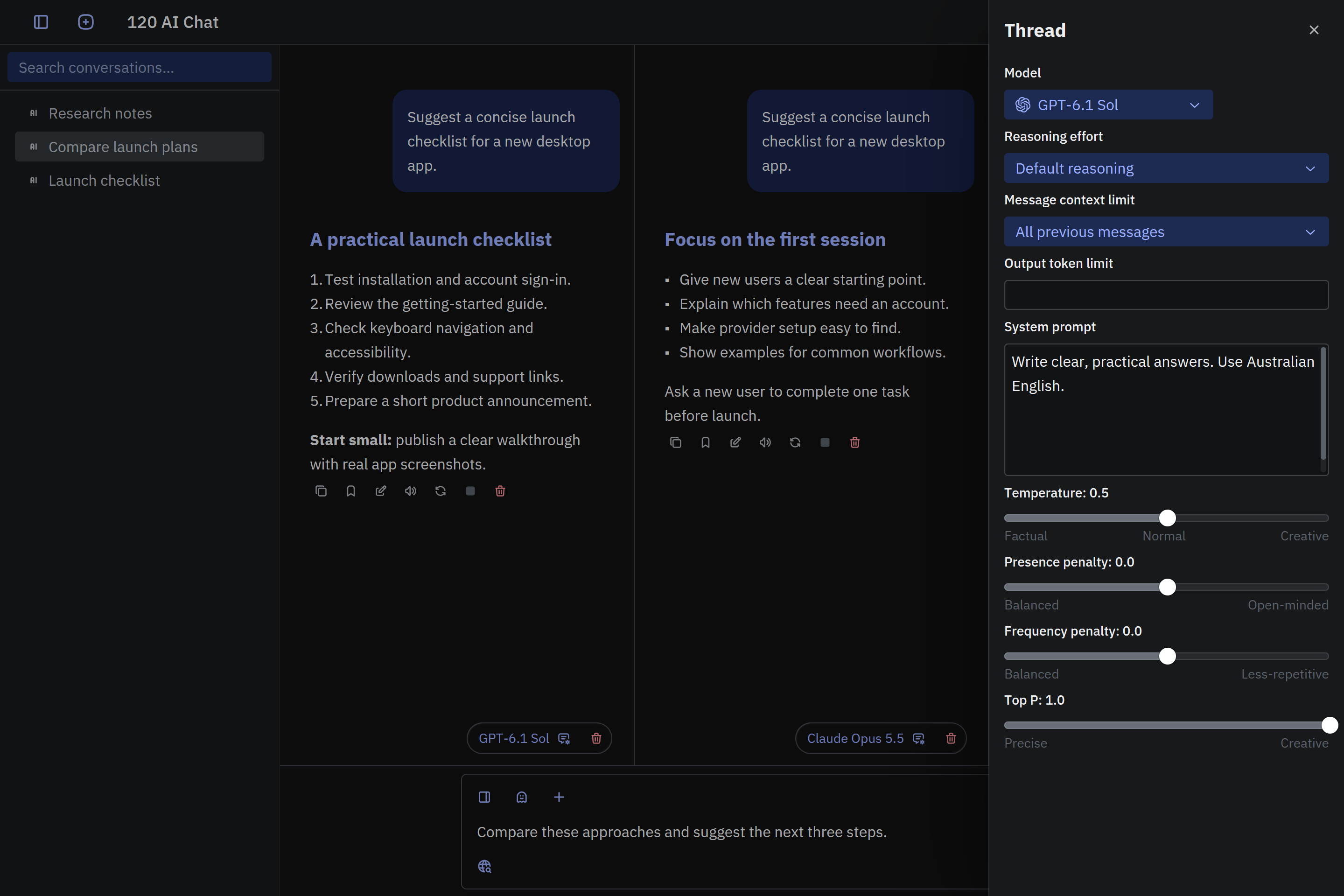
Compare up to three model responses side by side. Each thread has its own model, settings, and history. Sign in to use parallel threads.
Connect your own provider accounts or use a local server through Ollama or LM Studio. Available models and API charges depend on the provider.
A native desktop interface for macOS and Windows, with local conversation history.
Tune every conversation
Set the instructions, context, and limits for each thread.
Set a system prompt, choose how much earlier conversation to include, and adjust output limits and supported generation settings.
Request another response or stop an in-progress answer. Regeneration can incur another provider charge, and stopping does not guarantee cancellation of provider charges.
Use a short-lived chat that is cleared when you start or switch conversations. Temporary chats can use local storage while active; provider privacy terms still apply.
Search, attach, and create
Go beyond text with the web, your documents, and generated media.
Sign in to add web results to your questions. Uses provider search support or retrieved page content, requires internet access, and sends queries to external services.
Sign in to attach up to three images, PDFs, or plain-text files per selection. Ask questions about their contents using a model that supports the input.
Choose a supported image or video model and describe what you want to create. Image editing, generation limits, availability, and pricing depend on the model and provider account.
Details that save time
Small tools that make everyday chats smoother.
Adjust reasoning effort for models that support it. Available levels and their effect depend on the selected model and provider.
Listen to message text using your operating system's speech support on macOS and Windows. Stop playback directly from the message actions.
Mark important chats for quick access later. Organize your most valuable conversations and easily retrieve them with one click.
Download 120 AI Chat
 macOS
 macOS
 Windows
 Windows
 Linux
 Linux
Pricing
120 AI Chat
For working and researching.
- OpenAI (ChatGPT), Anthropic (Claude), Google AI (Gemini), OpenRouter, xAI (Grok), Replicate, Hugging Face (GPT OSS, Qwen, FLUX.1 dev), DeepSeek, Stability (Stable Diffusion Ultra), Vercel v0 integrations
- Local LLMs via Ollama and LM Studio (Llama, DeepSeek-R1, Mistral, Gemma 3)
- File attachments
- Code themes
- App themes (Gruvbox, Solarized, Catppuccin, and many more)
- Split chats & branching (multi-thread)
- Image generation (GPT Image, DALL·E, Stable Diffusion, Gemini, FLUX.1 dev)
- Video generation (Sora 2 Pro, Grok Imagine, Kling AI)
- AI read-aloud (text-to-speech)
- Prompts (optionally sticky)
- Web search & live plugin results
- Personal, non-commercial use
- For one personal user on one device